
You will first need to get your bearings which will be easiest from the field.
This document shows the VLAN access locations.
This picture shows how your sideline antennas should be setup if you are using the stadium provided VLAN.
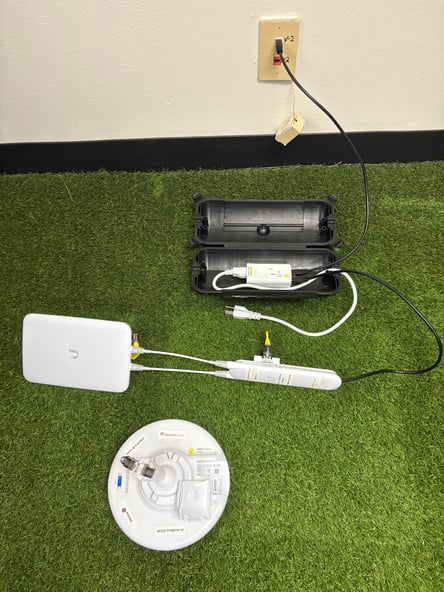
This video shows how to modify your sideline to use the stadium VLAN.
This picture shows how your sideline antennas should be setup if you are using antenna bridges like you normally do.
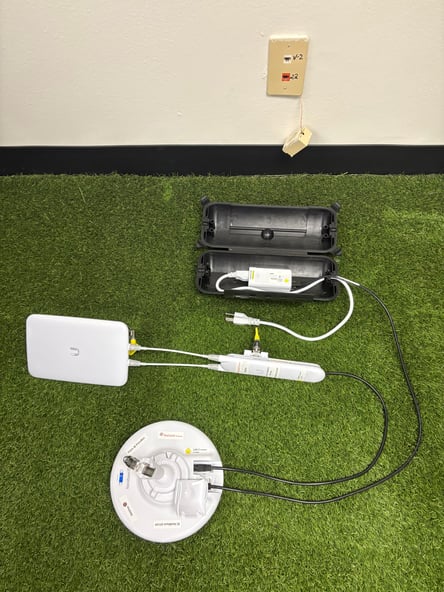
This video shows how to modify your sideline to use the antenna bridges like you normally do.
NOTE: The bridge antennas need to be set to the lower frequency range and higher output power in order to lock on.
Follow the instructions below to get your lock lights.
Once your iPad is connected to the SkyCoach network, go to safari and use the admin login for your bridge antennas:
- Navigate to the wireless tab and change the output power and center frequency.
-
Red/black 192.168.88.2 output power 10 center frequency 5175
- Red/white 192.168.88.3 output power 10 center frequency 5215
-
- Navigate to the dashboard to monitor the throughput numbers and RF environment.
- The highest is 131, you want to be in the 120's, it will work at lower numbers but download speeds will be slower.