PAGE SHORTCUTS:
PARTS:
- 6 stations: PressBox, Home Sideline, Visitor Sideline, EndZone, CoachBox, EndZone 2
- Pi Host, Green Gigabit Router, and White Gigabit Switch
- 10 AC Bridge Antennas: RB, RW, RWB, BW, COACH
- 1 Mesh Review AP for officials
- 2 Mesh CoachBox APs
- 2 Mesh-UMAD Sideline APs
- 3 Remote Camera Kits (One is brought by the Visiting Team)
- 2 powertubes
- 1 powerbox
- 2 powerbox mixed
HELPFUL LINKS:
Please schedule a training session with our specialist using THIS LINK. Have your SkyCoach equipment, cameras, and iPads available in a large office/classroom setting. Invite your setup staff/helpers. Our trainer will walk you through setting up the equipment and running a game. Performance and pro tips will also be shared at this time.
Please make note of the following:
- Your Kit# is found on the outside of your toolbox
- The username and password for your app are found in your SkyCoach Training email
- The wifi access codes for your kit are found in your SkyCoach Training email
- This is your model#: 10AC(RB,RW,RWB,BW,COACH)3M2MDPHGRWS-6P2R-2WT1WB2MB-CORSH
- Your kit style is a Obsidian Coach & Official Replay Shared
3 Steps To Set Up Your Kit
1. Set Up your Network
Click here to go to the network section.
2. Set Up Your Remote Camera Kit (RCK)
Click here to go to the RCK Setup Page.
3. Set Up Your iPad
Click here to go to the iPad Setup Page.
Obsidian Coach & Official Replay Shared
10AC(RB,RW,RWB,BW,COACH)3M2MDPHGRWS-6P2R-2WT1WB2MB-CORSH
3M2MDPHGRWS-6P2R-2WT1WB2MB-CORSH%20(Current).png?width=670&height=560&name=10AC(RB%2cRW%2cRWB%2cBW%2cCOACH)3M2MDPHGRWS-6P2R-2WT1WB2MB-CORSH%20(Current).png)
HOST BOX (brains)
PRESS BOX STATION: 1 host box, 1 RCK, 5 bridge antennas
You will need 2 power outlets: one to power the host box and one to power the RCK. The 4 round antennas will mount to one of your stands and point at the field as indicated by their labels. The host box and RCK will stay with the filmer.
[NEEDS NEW PHOTO WITH COACH ANTENNA AND PI HOST]
.png?width=670&height=427&name=HostBox%20-%201NHGRWS%20-%201RP%20-%20RB%2cRW%2cRWB%2cBW%20(VS).png)
- 1 green gigabit router
- 1 Pi host server
- 1 ethernet cable for your RCK
- 1 white UISP switch
- 1 AC red/black stickered antenna to bridge to the Home Sideline
- 1 AC red/white stickered antenna to bridge to the EndZone
-
- 1 AC red/white/black stickered antenna to bridge to the Visitor Sideline
-
- 1 AC black/white stickered antenna to bridge to the CoachBox
STATION BOX (field equipment)
SIDELINE STATIONS: 1 bridge antenna, 1 mesh-UMAD access point, 1 power supply (repeat for home and visitor) 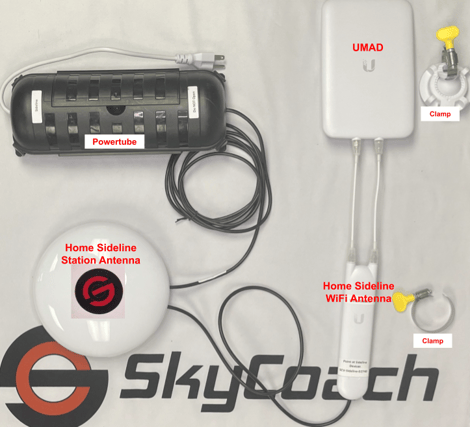
- 1 powertube
- 1 AC red/black stickered antenna for home sideline to bridge to the pressbox
- 1 Mesh-UMAD Sideline-WiFi antenna to connect to devices on the sideline
- SCH-Sideline-XXXXX for the home sideline iPads
- 1 Mesh-UMAD Sideline-WiFi antenna to connect to devices on the sideline
You will need 1 power outlet for each sideline power supply: home and visitor. Mount the 2 antennas to one of the stands and place it at the 35 yard line.
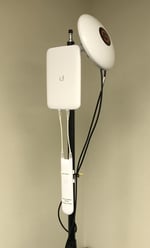 The round bridge antenna will point at the matching press box antenna as indicated by the label. Be sure the antenna has a clear and straight line of sight with no obstructions.
The skinny mesh antenna requires the booster and should be pointed down the sideline towards the ios devices. These provide the SCH- and SCV-Sideline-WiFi access for the sideline iPads and will ensure fast download speeds.
Any iPad can connect to the SkyCoach network via the provided access point ("WiFi") or connect directly via an ethernet adapter and switch port. Please talk to a SkyCoach team member to discuss direct connection on the sideline using powerbox+ power supply.
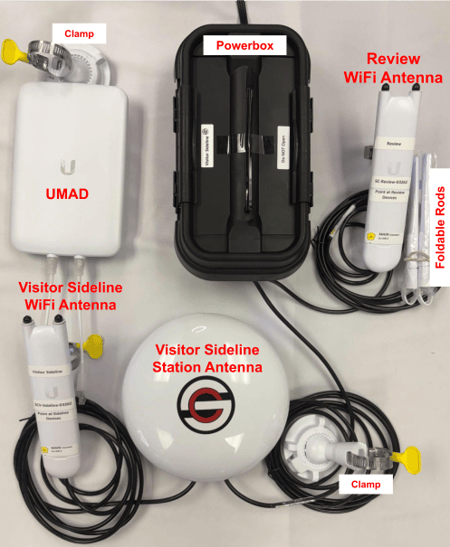
- 1 powerbox (this is to be used on either sideline where you would likely attach the review-wifi antenna)
- 1 AC red/white/black stickered antenna for visitor sideline to bridge to the pressbox
- 1 Mesh-UMAD Sideline-WiFi antenna to connect to devices on the sideline
- SCV-Sideline-XXXXX for the visitor sideline iPads
- 1 Mesh-UMAD Sideline-WiFi antenna to connect to devices on the sideline
- 1 Mesh Review-WiFi antenna to connect to official's device
- SC-Review-XXXXX for the official's iPad
END ZONE STATION: 1 bridge antenna, 1 RCK, 1 powerbox mixed
You will need 2 power outlets: one for the powertube and one to power the RCK. The round antenna will point at the matching host box antenna as indicated by the label.
You can mount the red/white round bridge antenna to the leg of your end zone tripod or camera stand. Be creative or even switch the ethernet cable for a longer one to get the best position for your antenna.
* Be sure the antenna has a clear and straight line of sight with absolutely no obstructions and especially avoiding the field goal post.
[NEEDS NEW PHOTO WITH MIXED POWERBOX]
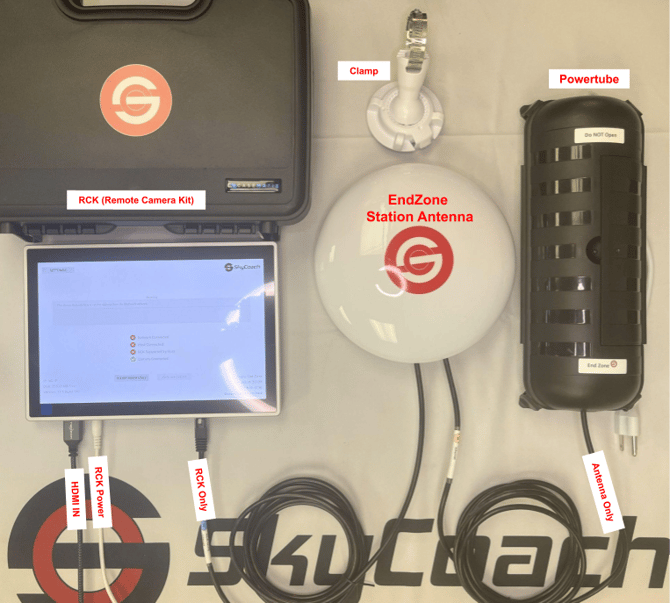
- 1 powerbox mixed
- 1 AC red/white stickered antenna in the end zone to bridge to the pressbox
- 1 ethernet cable for your RCK
NOTE: The photo above has excluded the official's mesh access point. However, in some cases this mesh access point that produces the SC-Review-WiFi will be connected here in the end zone and will require the use of the LAN port inside of the powertube. Please contact SkyCoach support if you need assistance.
- From power tube poe injector, LAN to RCK
- From round station antenna, LAN2 to SC-Review-WiFi
END ZONE 2 STATION: 1 bridge antenna, 1 RCK, 1 powerbox mixed
You will need 2 power outlets: one for the powertube and one to power the RCK. The round antenna will point at the matching host box antenna as indicated by the label.
You can mount the red/white round bridge antenna to the leg of your end zone tripod or camera stand. Be creative or even switch the ethernet cable for a longer one to get the best position for your antenna.
* Be sure the antenna has a clear and straight line of sight with absolutely no obstructions and especially avoiding the field goal post.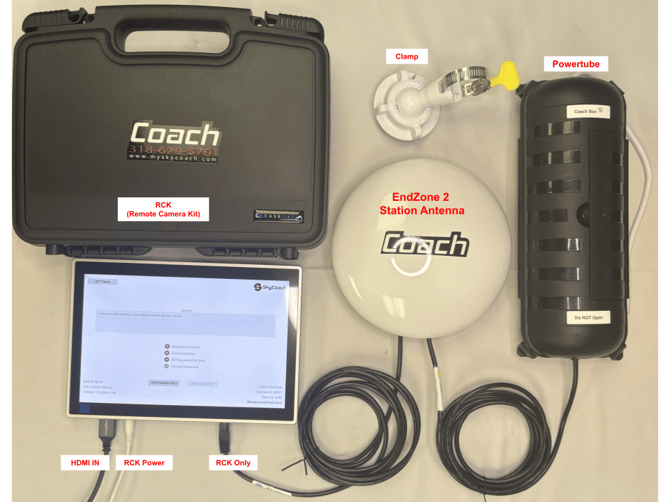
- 1 AC COACH stickered antenna in the end zone to bridge to the pressbox
- 1 ethernet cable for your RCK
- 1 powerbox mixed
COACHBOX STATION: 1 bridge antenna, 1 mesh access point, 1 powertube
You will use the coahbox station when the filmers and press box coaches are on opposite sides of the field. The filmer will keep the host box and RCK while the coaches will use the coachbox station.
You will need 1 power outlet for the power supply. Mount the round antenna to one of the stands and place it with a clear and straight line of sight to the matching antenna in the opposite pressbox. The round antenna will point at the matching host box antenna as indicated by the label.
* The "skinny rabbit ear" mesh antenna should be in the room with the coaches. This provides the SCV-CoachBox-WiFi access for the coachbox iPads and will ensure fast download speeds.
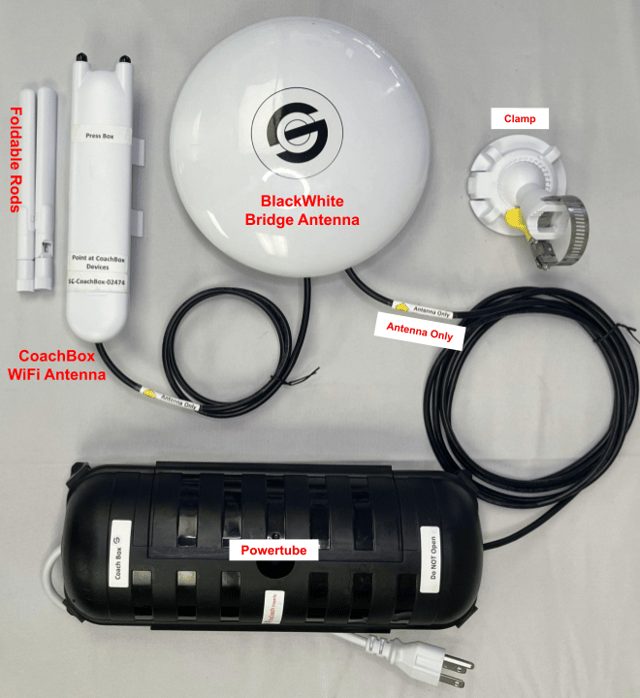
- 1 AC black/white stickered antenna in the coach box to bridge to the pressbox
- 1 Mesh CoachBox-WiFi antenna to connect to devices in the press box1 powertube
- SCV-CoachBox-XXXXX for the visitor coach booth
- 1 powertube
3 POWER SUPPLY types for this model:
Powertube
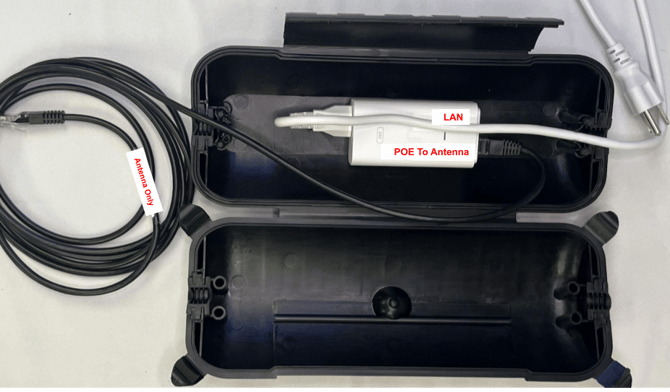
- Powertube with 1 white POE injector
-
The red POE24 port on the injector uses a 10' ethernet cable to connect to the Main port on the round antenna
- The LAN port on the injector can be left empty OR connect a device (like RCK or iPad) to the network
-
- The cables crossover to exit
Powerbox (for station to connect review-wifi)
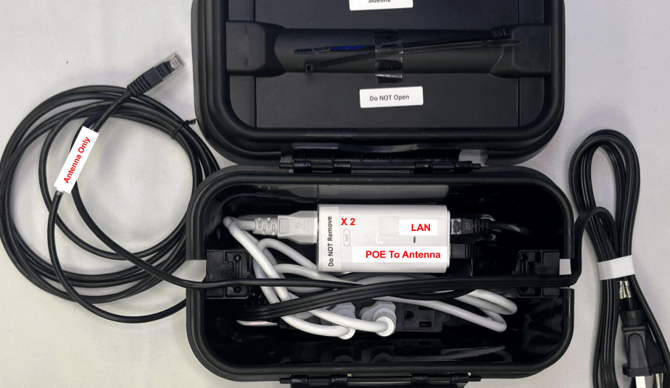
-
Powerbox with 2 white POE injectors
- LAN to LAN connected with 6" ethernet
- The red POE24 port on the injector uses a 10' ethernet cable to connect to the Main port on the round antenna
- The open POE port on the top injector can be left empty OR connect to the SC-Review-WiFi "bunny ear" antenna OR connect a device (like RCK or iPad) to the network
- The cables crossover to exit
Mixed Powerbox (for endzone only).png?width=387&height=386&name=Mixed%20Power%20Box%20(1).png)
- 1 white POE injector
- The red POE24 port on the injector use a 10' ethernet cable to connect to the main port on the antenna
- 1 black POE injector
- The red POE24 port on the injector use a 10' ethernet cable to connect to the ethernet port on the RCK
- The LAN ports on the injectors connect to each other with a 6" ethernet
- The cables crossover to exit
You have completed Step 1 (Setting Up Network)
Proceed to Step 2 (Setup RCK)
Proceed to Step 3 (Setup iPad)