PAGE SHORTCUTS:
PARTS:
- 1 station: PressBox
- Pi Host and Green Gigabit Router
- 1 Mesh Review AP for officials
- 2 Remote Camera Kits (RCK Pro)
HELPFUL LINKS:
Please schedule a training session with our specialist using THIS LINK. Have your SkyCoach equipment, cameras, and iPads available in a large office/classroom setting. Invite your setup staff/helpers and your coaches. Our trainer will walk you through setting up the equipment and running a game. Performance and pro tips will also be shared at this time.
Please make note of the following:
- Your Kit# found on the outside of your toolbox
- The username and password for your app found in your SkyCoach Training email
- The wifi access codes for your kit are found in your SkyCoach Training email
- This is your model# 1MPHGR-1P2RP-GOR
- Your kit style is a Nickel Plus 2 Official Replay Generic
3 Parts To Set Up Your Kit
A. Set Up Your Network
Click here to to go the network section.
B. Set Up your Remote Camera Kit (RCK)
Click here to go to the RCK Setup page. (4 steps)
C. Set Up Your iPad
Click here to go to the iPad Setup page. (4 stages)
Nickel Plus 2 Official Replay Generic
1MPHGR-1P2RP-GOR
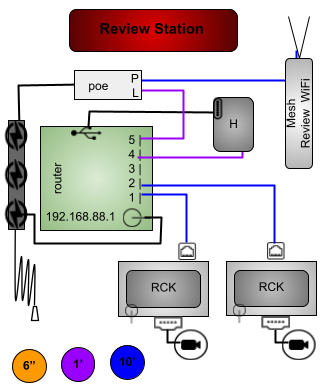
HOST BOX (brains)
PRESS BOX STATION: 1 host box, 2 RCKs, 1 mesh access point
You will need 3 power outlets: one to power the host box and two to power the RCKs.
Attach the foldable rods to the top of the mesh antenna and place it near the iPad. The "skinny rabbit ear" mesh antenna provides the SC-Review-WiFi access for the official's iPad and will ensure fastest download speeds when placed next to the iPad.
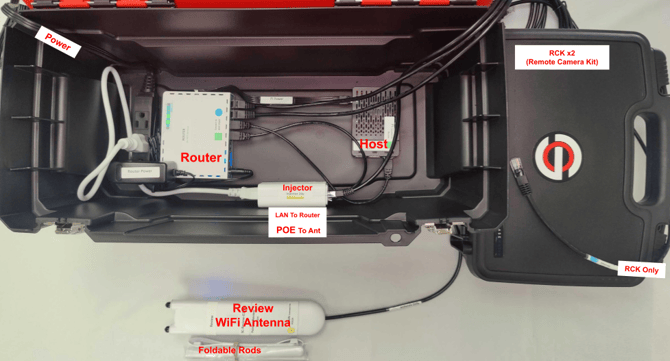
-
1 green gigabit router
-
1 Pi host server
- 2 ethernet cables for your RCKs
-
- 1 Mesh Review-WiFi antenna to connect to the official's device
- This is connected to the LAN port of the injector
- SC-Review-XXXXX for the score table
You have completed Part A (Setting Up Network)
Proceed to Part B (Setup RCK)
Proceed to Part C (Setup iPad)