
PAGE SHORTCUTS:
PARTS:
- 2 Stations: PressBox, Sideline
- Pi Host and Green Gigabit Router
- 2 AC Bridge Antennas
- 1 Mesh CoachBox AP
- 1 Mesh-UMAD Sideline AP
- 1 Remote Camera Kit
- 1 Powertube
HELPFUL LINKS:
- Setup Instructions, User Guide
.png?width=25&height=25&name=Page%20under%20construction%20(1).png) [review and combine the 2 files into most recent]
[review and combine the 2 files into most recent] - Diagram
- Pregame Checklist
- How to Tune Your Network
- Keys to Success
Please schedule a training session with our specialist using THIS LINK. Have your SkyCoach equipment, cameras, and iPads available in an office/classroom setting. Invite your setup staff/helpers. Our trainer will walk you through setting up the equipment and running a game. Performance and pro tips will also be shared at this time.
Please make note of the following:
- Your Kit# is found on the outside of your toolbox
- The username and password for your app found in your SkyCoach Training email
- The wifi access codes for your kit are found in your SkyCoach Training email
- This is your model#: 2AC1M1MDPHGR-2P1RP-1WT-CR
-
Your kit style is a Silver Coach's Replay
3 Parts To Set Up Your Kit
A. Set Up Your Network
Click here to to go the network section.
B. Set Up your Remote Camera Kit (RCK)
Click here to go to the RCK Setup page. (4 steps)
C. Set Up Your iPad
Click here to go to the iPad Setup page. (4 stages)
Silver Coach Replay
2AC(RB)1M1MDPHGR-2P1RP-1WT-CR
1M1MDPHGR-2P1RP-1WT-CR%20(current).png?width=670&height=354&name=2AC(RB)1M1MDPHGR-2P1RP-1WT-CR%20(current).png)
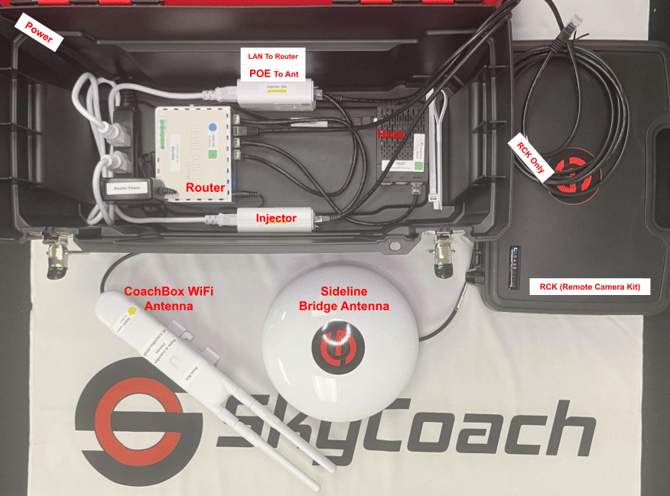
HOST BOX (brains)
PRESSBOX STATION: 1 host box, 1 RCK, 1 bridge antenna, 1 mesh access point
You will need 2 power outlets: one to power the host box and one to power the RCK. The round antenna will mount to one of your stands and point at the field as indicated by the labels. The host box and RCK will stay with the filmer.
Use a long ethernet cable to run from the LAN2 port on your red/black round bridge antenna to the mesh access point (the "skinny" antenna in the photo). Attach the foldable rods to the top of the mesh antenna and place it in the room with the coaches.
* The skinny "rabbit ear" mesh antenna provides the SC-CoachBox-WiFi access for the coachbox iPads and will ensure fastest download speeds when placed in the room.
-
1 green gigabit router
- 1 ethernet cable for your RCK
- 1 Pi host server
- 2 ethernet cables connected to LAN port on each injector
- 1 AC red/black stickered antenna to bridge to Sideline, connected from the POE24 port of injector to the Main port of antenna
- 1 Mesh CoachBox-WiFi antenna to connect to devices in the press box
- This is connected to the POE24 port of the injector
-
- SC-CoachBox-XXXXX
STATION BOX (field equipment)
SIDELINE STATION: 1 bridge antenna, 1 mesh-UMAD access point, 1 powertube
You will need 1 power outlet for the sideline powertube. Mount the 2 antennas to one of the stands and place it at the 35 yard line.
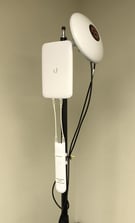 The round bridge antenna will point at the matching press box antenna as indicated by the label. Be sure the antenna has a clear and straight line of sight with no obstructions.
The skinny mesh antenna requires the booster and should be pointed down the sideline towards the ios devices. This provides the SC-Sideline-WiFi access for the sideline iPads and will ensure fast download speeds.
Any iPad can connect to the SkyCoach network via the provided access point ("WiFi") or connect directly via an ethernet adapter and switch port. Please talk to a SkyCoach team member to discuss direct connection on the sideline via powerbox+ power supply.
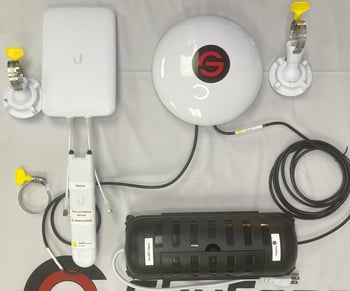
- 1 powertube
- 1 AC red/black stickered antenna to bridge to pressbox and power the WiFi antenna, connected from the POE24 port of the powertube injector to the Main port of the red/black round antenna
- 1 Mesh-UMAD Sideline-WiFi antenna that connects to devices on the sideline
- This is connected to the LAN2 port of the red/black round antenna
- SC-Sideline-XXXXX
- 1 AC red/black stickered antenna to bridge to pressbox and power the WiFi antenna, connected from the POE24 port of the powertube injector to the Main port of the red/black round antenna
1 POWER SUPPLY type for this model:
Powertube
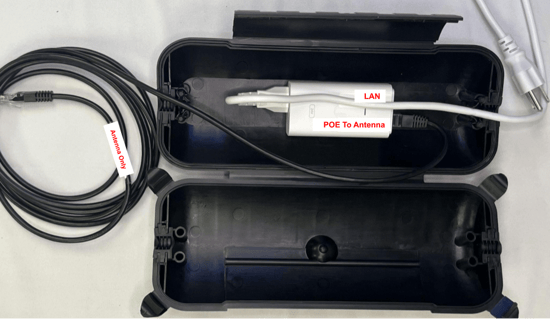
- Powertube with 1 white POE injector
- The cables crossover to exit
-
The red POE24 port on the injector uses a 10' ethernet cable to connect to the Main port on the round antenna
- The LAN port on the injector can be left empty OR connect a device (like RCK or iPad) to the network
You have completed Part A (Setting Up Network)
Proceed to Part B (Setup RCK)
Proceed to Part C (Setup iPad)