PAGE SHORTCUTS:
PARTS:
- 4 stations: PressBox, Home Sideline, Visitor Sideline, EndZone
- Pi Host and Green Gigabit Router
- 6 AC Bridge Antennas (RB, RW, RWB)
- 2 Remote Camera Kits (RCK Pro)
- 3 powertubes
HELPFUL LINKS:
Please schedule a training session with our specialist using THIS LINK. Have your SkyCoach equipment, cameras, and iPads available in an office/classroom setting. Invite your setup staff/helpers. Our trainer will walk you through setting up the equipment and running a game. Performance and pro tips will also be shared at this time.
Please make note of the following:
- Your Kit# is found on the outside of your toolbox
- The username and password for your app are found in your SkyCoach Training email
- The wifi access codes for your kit are found in your SkyCoach Training email
- This is your model#: 6AC(RB,RW,RWB)1M1M5PHGR-4P2RP-3WT-CR
- Your kit style is a Diamond Coach Replay
3 Parts To Set Up Your Kit
A. Set Up your Network
Click here to go to the network section.
B. Set Up Your Remote Camera Kit (RCK)
Click here to go to the RCK Setup Page. (4 steps)
C. Set Up Your iPad
Click here to go to the iPad Setup Page. (4 stages)
Diamond Coach Replay
6AC(RB,RW,RWB)1M1M5PHGR-4P2RP-3WT-CR
1M1M5PHGR-4P2RP-3WT-CR%20(current).png?width=670&height=551&name=6AC(RB%2cRW%2cRWB)1M1M5PHGR-4P2RP-3WT-CR%20(current).png)
HOST BOX (brains)
PRESS BOX STATION:
STATION BOX (field equipment)
SIDELINE STATIONS:
END ZONE STATION:
CAMERA STATION:
1 POWER SUPPLY types for this model:
Powertube
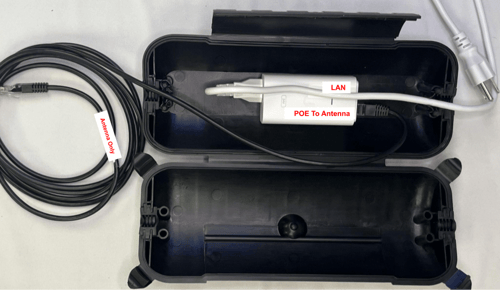
- Powertube with 1 white POE injector
-
The red POE24 port on the injector uses a 10' ethernet cable to connect to the Main port on the round antenna
- The LAN port on the injector can be left empty OR connect a device (like RCK or iPad) to the network
-
- The cables crossover to exit
You have completed Part A (Setting Up Network)
Proceed to Part B (Setup RCK)
Proceed to Part C (Setup iPad)